AFL++实战其一

练习1 - Xpdf

版本:XPDF 3.02

漏洞编号:CVE-2019-13288

CVE-2019-13288 是一个漏洞,可能导致通过精心制作的文件进行无限递归。

由于程序中每个被调用函数都会在栈上分配一个栈帧,如果某个函数被递归调用过多次,可能会导致堆栈内存耗尽和程序崩溃。

因此,远程攻击者可以利用这一点发动 DoS 攻击。

下载Xpdf

创建项目目录并下载源码:

1
2
3
4
5
mkdir -p $HOME/fuzz_main/exercise1/
cd $HOME/fuzz_main/exercise1/
mkdir fuzzing_xpdf && cd fuzzing_xpdf/
wget https://dl.xpdfreader.com/old/xpdf-3.02.tar.gz
tar -xvzf xpdf-3.02.tar.gz

构建Xpdf:

1
2
3
4
5
cd xpdf-3.02
sudo apt update && sudo apt install -y build-essential gcc
./configure --prefix="$HOME/fuzz_main/exercise1/fuzzing_xpdf/install/"
make
make install

下载测试用例:

1
2
3
cd $HOME/fuzz_main/exercise1/fuzzing_xpdf/
mkdir pdf_examples && cd pdf_examples
wget https://github.com/mozilla/pdf.js-sample-files/raw/master/helloworld.pdf

试试看是否构建成功:

1
pdfinfo $HOME/fuzz_main/exercise1/fuzzing_xpdf/pdf_examples/helloworld.pdf

输出:

1
2
3
4
5
6
7
8
9
10
11
12
13
14
15
╰─ pdfinfo $HOME/fuzz_main/exercise1/fuzzing_xpdf/pdf_examples/helloworld.pdf
Custom Metadata: no
Metadata Stream: no
Tagged: no
UserProperties: no
Suspects: no
Form: none
JavaScript: no
Pages: 1
Encrypted: no
Page size: 200 x 200 pts
Page rot: 0
File size: 678 bytes
Optimized: no
PDF version: 1.7

安装AFL++

可见:https://github.com/AFLplusplus/AFLplusplus/blob/stable/docs/INSTALL.md

使用AFL++

AFL 是一种覆盖导向的模糊器 ,意味着它会为每个变异输入收集覆盖信息,以发现新的执行路径和潜在的漏洞。实际上,它会在每个基本代码块中插入函数(插桩)来获得反馈信息,常见的是在跳转代码jz类附近插入函数。

我们需要用AFL的专用编译器来重新编译我们的代码。

1
2
3
rm -fr $HOME/fuzz_main/exercise1/fuzzing_xpdf/install/
cd $HOME/fuzz_main/exercise1/xpdf-3.02/
make clean

使用afl-clang-fast编译器构建 xpdf:

1
2
3
4
export LLVM_CONFIG="llvm-config-11"
CC=$HOME/AFLplusplus/afl-clang-fast CXX=$HOME/AFLplusplus/afl-clang-fast++ ./configure --prefix="$HOME/fuzz_main/exercise1/fuzzing_xpdf/install/"
make
make install

需要按照你实际的AFL路径来改变。

现在你可以运行FUZZ:

1
2
3
4
mkdir $HOME/fuzz_main/exercise1/fuzz
cd $HOME/fuzz_main/exercise1/fuzz
sudo afl-system-config
afl-fuzz -i $HOME/fuzz_main/exercise1/fuzzing_xpdf/pdf_examples -o ./out -s 123 -- $HOME/fuzz_main/exercise1/fuzzing_xpdf/install/bin/pdftotext @@ $HOME/fuzz_main/exercise1/fuzzing_xpdf/output
参数 说明
-i 输入目录,存放初始种子 PDF 文件,AFL 会基于这些文件进行变异
-o 输出目录,存放崩溃样本、挂起样本、队列文件等测试结果
-s 123 设置随机种子为 123,使模糊测试过程可重现
-- 分隔符,后面是被测试的目标程序及其参数
@@ 关键占位符,AFL 会自动将其替换为变异后的临时文件路径
最后的 $HOME/fuzzing_xpdf/output pdftotext 的输出参数,指定转换后的文本存放位置

接下来就是耐心等待:

1
2
3
4
5
6
7
8
9
10
11
12
13
14
15
16
17
18
19
20
21
22
23
24
25
26
27
28
29
30
31
32
    AFL ++4.41a {default} (../fuzzing_xpdf/install/bin/pdftotext) [explore]
┌─ process timing ────────────────────────────────────┬─ overall results ────┐
│ run time : 0 days, 0 hrs, 30 min, 26 sec │ cycles done : 0 │
│ last new find : 0 days, 0 hrs, 0 min, 4 sec │ corpus count : 2079 │
│last saved crash : 0 days, 0 hrs, 19 min, 20 sec │saved crashes : 2 │
│ last saved hang : 0 days, 0 hrs, 10 min, 51 sec │ saved hangs : 10 │
├─ cycle progress ─────────────────────┬─ map coverage┴──────────────────────┤
│ now processing : 1966.2 (94.6%) │ map density : 4.25% / 11.90% │
│ runs timed out : 0 (0.00%) │ count coverage : 4.63 bits/tuple │
├─ stage progress ─────────────────────┼─ findings in depth ─────────────────┤
│ now trying : havoc │ favored items : 194 (9.33%) │
│ stage execs : 381/400 (95.25%) │ new edges on : 364 (17.51%) │
│ total execs : 1.46M │ total crashes : 2 (2 saved) │
exec speed : 799.4/sec │ total tmouts : 88 (0 saved) │
├─ fuzzing strategy yields ────────────┴─────────────┬─ item geometry ───────┤
│ bit flips : 3/59.1k, 1/59.1k, 2/59.1k │ levels : 19 │
│ byte flips : 0/7392, 0/7381, 2/7359 │ pending : 1544 │
│ arithmetics : 10/517k, 0/1.03M, 0/1.03M │ pend fav : 0 │
│ known ints : 0/66.4k, 1/280k, 2/411k │ own finds : 2078 │
│ dictionary : 0/0, 0/0, 0/0, 0/0 │ imported : 0 │
│havoc/splice : 1774/1.11M, 0/0 │ stability : 100.00% │
│py/custom/rq : unused, unused, unused, unused ├───────────────────────┘
│ trim/eff : 0.41%/170k, 99.62% │ [cpu000: 75%]
└─ strategy: explore ────────── state: in progress ──┘^C

+++ Testing aborted by user +++

[!] Stopped during the first cycle, results may be incomplete.
(For info on resuming, see /usr/local/share/doc/afl/README.md)
[*] Writing ./out/default/fastresume.bin ...
[+] fastresume.bin successfully written with 763463 bytes.
[+] We're done here. Have a nice day!

直到overall results中的saved crashes不再为0时就可以停止FUZZ。

1
cd $HOME/fuzz_main/exercise1/fuzz/out/default/crashes

该目录下就是导致程序崩溃的输入文件集合。

重现崩溃过程

将崩溃输入传递给pdftotext:

1
$HOME/fuzz_main/exercise1/fuzzing_xpdf/install/bin/pdftotext $HOME/fuzz_main/exercise1/fuzz/out/default/crashes/<your filename> $HOME/fuzz_main/exercise1/fuzzing_xpdf/output
1
2
3
4
╰─ $HOME/fuzz_main/exercise1/fuzzing_xpdf/install/bin/pdftotext ./out/default/crashes/id:000000,sig:11,src:001110,time:252252,execs:138241,op:havoc,rep:13 $HOME/fuzz_main/exercise1/fuzzing_xpdf/output
Error (18145): Illegal character ')'
Error: PDF file is damaged - attempting to reconstruct xref table...
[1] 471912 segmentation fault $HOME/fuzz_main/exercise1/fuzzing_xpdf/install/bin/pdftotext

可以看到存在崩溃。

调试

重新编译带源码的文件:

1
2
3
4
5
6
rm -fr $HOME/fuzz_main/exercise1/fuzzing_xpdf/install/
cd $HOME/fuzz_main/exercise1/xpdf-3.02/
make clean
CFLAGS="-g -O0" CXXFLAGS="-g -O0" ./configure --prefix="$HOME/fuzz_main/exercise1/fuzzing_xpdf/install/"
make
make install

我们使用gdb分析该崩溃文件:

1
gdb --args $HOME/fuzz_main/exercise1/fuzzing_xpdf/install/bin/pdftotext $HOME/fuzz_main/exercise1/fuzz/out/default/crashes/<your filename> $HOME/fuzz_main/exercise1/fuzzing_xpdf/output

然后再gdb中输入:

1
>> r

你会看见输出:

1
2
3
4
5
6
7
8
9
10
11
12
13
14
15
16
17
18
19
20
21
22
23
24
25
26
27
28
29
30
31
32
33
34
35
36
37
38
39
40
41
42
43
44
45
46
47
48
49
50
51
52
53
54
55
56
57
58
59
60
61
62
63
64
65
66
67
68
69
70
71
72
73
74
75
76
77
78
79
GNU gdb (Ubuntu 15.0.50.20240403-0ubuntu1) 15.0.50.20240403-git
Copyright (C) 2024 Free Software Foundation, Inc.
License GPLv3+: GNU GPL version 3 or later <http://gnu.org/licenses/gpl.html>
This is free software: you are free to change and redistribute it.
There is NO WARRANTY, to the extent permitted by law.
Type "show copying" and "show warranty" for details.
This GDB was configured as "x86_64-linux-gnu".
Type "show configuration" for configuration details.
For bug reporting instructions, please see:
<https://www.gnu.org/software/gdb/bugs/>.
Find the GDB manual and other documentation resources online at:
<http://www.gnu.org/software/gdb/documentation/>.

For help, type "help".
Type "apropos word" to search for commands related to "word"...
pwndbg: loaded 175 pwndbg commands and 47 shell commands. Type pwndbg [--shell | --all] [filter] for a list.
pwndbg: created $rebase, $base, $hex2ptr, $bn_sym, $bn_var, $bn_eval, $ida GDB functions (can be used with print/break)
Reading symbols from /home/zlsf/fuzz_main/exercise1/fuzzing_xpdf/install/bin/pdftotext...
------- tip of the day (disable with set show-tips off) -------
Want to NOP some instructions? Use patch <address> 'nop; nop; nop'
pwndbg> r
Starting program: /home/zlsf/fuzz_main/exercise1/fuzzing_xpdf/install/bin/pdftotext /home/zlsf/fuzz_main/exercise1/fuzz/out/default/crashes/id:000000,sig:11,src:001110,time:252252,execs:138241,op:havoc,rep:13 /home/zlsf/fuzz_main/exercise1/fuzzing_xpdf/output
[Thread debugging using libthread_db enabled]
Using host libthread_db library "/lib/x86_64-linux-gnu/libthread_db.so.1".
Error (18145): Illegal character ')'
Error: PDF file is damaged - attempting to reconstruct xref table...

Program received signal SIGSEGV, Segmentation fault.
0x00007ffff78ac4d9 in _int_malloc (av=av@entry=0x7ffff7a03ac0 <main_arena>, bytes=4) at ./malloc/malloc.c:4460
warning: 4460 ./malloc/malloc.c: No such file or directory
LEGEND: STACK | HEAP | CODE | DATA | WX | RODATA
──────────────────────────────────────────────────────────────[ REGISTERS / show-flags off / show-compact-regs off ]───────────────────────────────────────────────────────────────
RAX 0x17d41
RBX 0x20
RCX 0x55555742b2c0 ◂— 0
RDX 0x21
RDI 0x55555742b2b0 ◂— 0
RSI 4
R8 0x7ffff7a03b20 (main_arena+96) —▸ 0x55555742b2c0 ◂— 0
R9 0x20
R10 1
R11 0
R12 0x7ffff7a03ac0 (main_arena) ◂— 0
R13 4
R14 0x55555742b2b0 ◂— 0
R15 0x20
RBP 0x7fffff7ff060 —▸ 0x7fffff7ff0a0 ◂— 1
RSP 0x7fffff7fefe0
RIP 0x7ffff78ac4d9 (_int_malloc+3945) ◂— call alloc_perturb
───────────────────────────────────────────────────────────────────────[ DISASM / x86-64 / set emulate on ]────────────────────────────────────────────────────────────────────────
► 0x7ffff78ac4d9 <_int_malloc+3945> call alloc_perturb <alloc_perturb>
rdi: 0x55555742b2b0 ◂— 0
rsi: 4
0x7ffff78ac4de <_int_malloc+3950> jmp _int_malloc+1402 <_int_malloc+1402>

0x7ffff78abaea <_int_malloc+1402> mov rax, qword ptr [rbp - 0x38]
0x7ffff78abaee <_int_malloc+1406> sub rax, qword ptr fs:[0x28]
0x7ffff78abaf7 <_int_malloc+1415> jne _int_malloc+3955 <_int_malloc+3955>

0x7ffff78abafd <_int_malloc+1421> add rsp, 0x58
0x7ffff78abb01 <_int_malloc+1425> mov rax, r14
0x7ffff78abb04 <_int_malloc+1428> pop rbx
0x7ffff78abb05 <_int_malloc+1429> pop r12
0x7ffff78abb07 <_int_malloc+1431> pop r13
0x7ffff78abb09 <_int_malloc+1433> pop r14
─────────────────────────────────────────────────────────────────────────────────────[ STACK ]─────────────────────────────────────────────────────────────────────────────────────
<Could not read memory at 0x7fffff7fefe0>
───────────────────────────────────────────────────────────────────────────────────[ BACKTRACE ]───────────────────────────────────────────────────────────────────────────────────
► 0 0x7ffff78ac4d9 _int_malloc+3945
1 0x7ffff78ad812 malloc+418
2 0x555555673212 copyString+82
3 0x555555673212 copyString+82
4 0x5555556214c1 Lexer::getObj(Object*)+9361
5 0x55555562bc47 Parser::getObj(Object*, unsigned char*, CryptAlgorithm, int, int, int)+1207
6 0x55555562bc47 Parser::getObj(Object*, unsigned char*, CryptAlgorithm, int, int, int)+1207
7 0x555555662a74 XRef::fetch(int, int, Object*)+468
───────────────────────────────────────────────────────────────────────────────────────────────────────────────────────────────────────────────────────────────────────────────────
pwndbg>

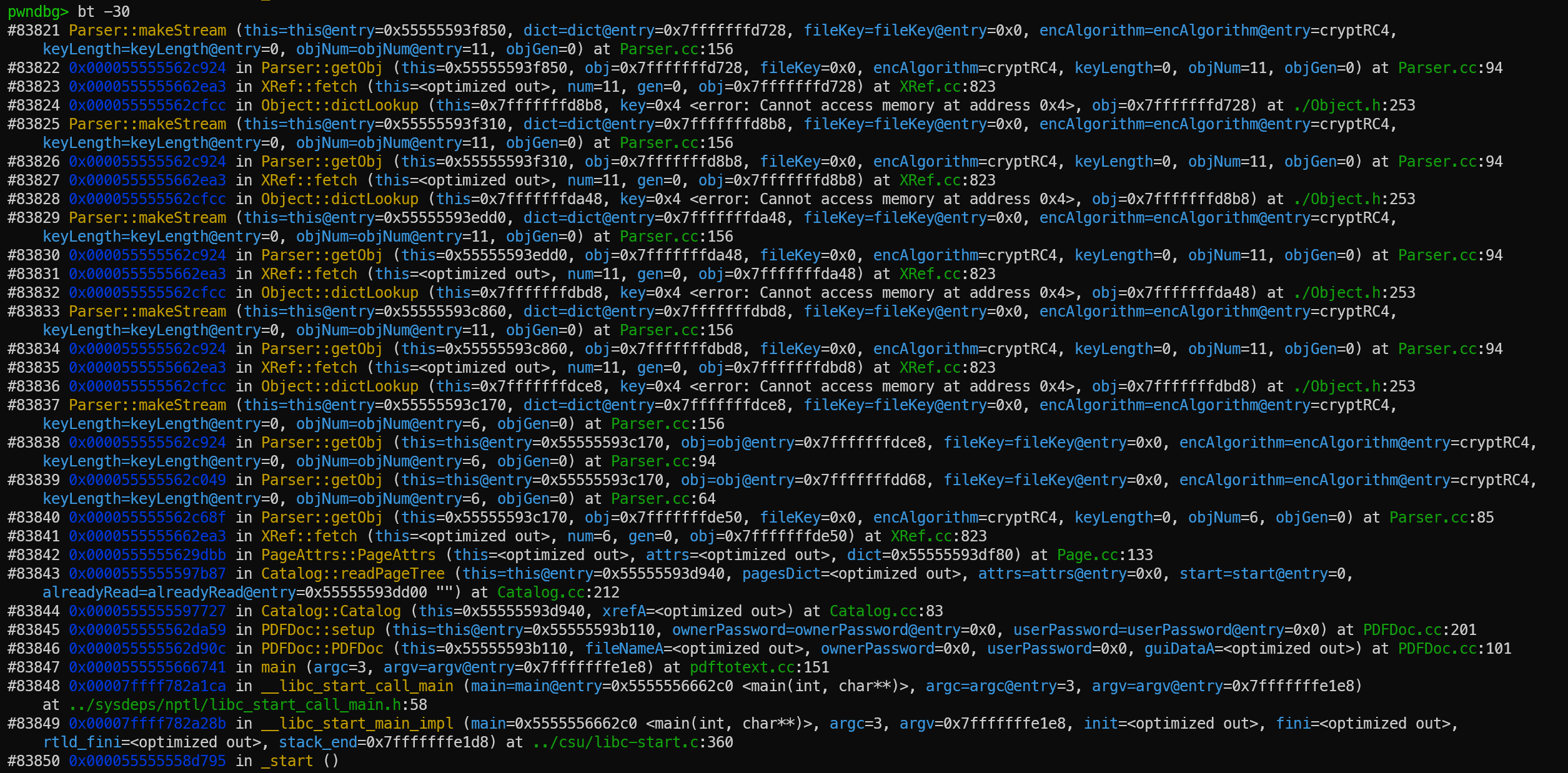
输入bt回溯调用的栈:

1
>> bt -30

可以查看程序启动最开始调用的30层。程序是无限递归的,全部查看不现实。

我们可以看到出现了循环调用:

1
2
3
4
5
6
7
8
9
Parser::makeStream (Frame N)

Parser::getObj (Frame N+1)

XRef::fetch (Frame N+2)

Object::dictLookup (Frame N+3)

Parser::makeStream (Frame N+4)

源码追踪

main (argc=3, argv=argv@entry=0x7fffffffe1e8):pdftotext.cc:89

1
2
3
4
5
6
7
8
9
10
int main(int argc, char *argv[]) {
PDFDoc *doc;
GString *fileName;
GString *textFileName;
GString *ownerPW, *userPW;
TextOutputDev *textOut;
FILE *f;
// ...
doc = new PDFDoc(fileName, ownerPW, userPW); //pdftotext.cc:151
// ...

新建了一个PDFDoc对象并传入文件名和密码。

PDFDoc::PDFDoc (this=0x55555593b110, fileNameA=<optimized out>, ownerPassword=0x0, userPassword=0x0, guiDataA=<optimized out>):PDFDoc.cc:160

1
2
3
4
5
6
7
8
9
10
11
12
13
PDFDoc::PDFDoc(BaseStream *strA, GString *ownerPassword,
GString *userPassword, void *guiDataA) {
ok = gFalse;
errCode = errNone;
guiData = guiDataA;
if (strA->getFileName()) {
fileName = strA->getFileName()->copy();
} else {
fileName = NULL;
}
// ...
ok = setup(ownerPassword, userPassword); //PDFDoc.cc:177
// ...

主要是想从流中获得文件名,启动setup函数完成核心初始化。

PDFDoc::setup (this=this@entry=0x55555593b110, ownerPassword=ownerPassword@entry=0x0, userPassword=userPassword@entry=0x0):PDFDoc.cc:180

1
2
3
4
5
6
7
8
9
10
11
12
13
14
15
16
GBool PDFDoc::setup(GString *ownerPassword, GString *userPassword) {
str->reset();

// check header
checkHeader();

// read xref table
xref = new XRef(str);
if (!xref->isOk()) {
error(-1, "Couldn't read xref table");
errCode = xref->getErrorCode();
return gFalse;
}
// ...
catalog = new Catalog(xref); //PDFDoc.cc:201
// ...

对pdf进行初级检查,从调用流上看问题发生在读取目录这一块也就是新建Catalog这行。

Catalog::Catalog (this=0x55555593d940, xrefA=<optimized out>):Catalog.cc:30

1
2
3
4
5
6
7
8
9
Catalog::Catalog(XRef *xrefA) {
Object catDict, pagesDict, pagesDictRef;
Object obj, obj2;
char *alreadyRead;
int numPages0;
int i;
// ...
numPages = readPageTree(pagesDict.getDict(), NULL, 0, alreadyRead); //Catalog.cc:83
// ...

readPageTree从函数名来看像是要读取页目录树。

Catalog::readPageTree (this=this@entry=0x55555593d940, pagesDict=<optimized out>, attrs=attrs@entry=0x0, start=start@entry=0,alreadyRead=alreadyRead@entry=0x55555593dd00 ""):Catalog.cc:182

1
2
3
4
5
6
7
8
9
10
11
int Catalog::readPageTree(Dict *pagesDict, PageAttrs *attrs, int start,
char *alreadyRead) {
Object kids;
Object kid;
Object kidRef;
PageAttrs *attrs1, *attrs2;
Page *page;
int i, j;
// ...
attrs2 = new PageAttrs(attrs1, kid.getDict()); //Catalog.cc:212
// ...

这里实锤了要递归读取 PDF 页面树结构,PageAttrs是用来创建新的页面属性对象,继承父节点的属性。

PageAttrs::PageAttrs (this=<optimized out>, attrs=<optimized out>, dict=0x55555593df80):Page.cc:63

1
2
3
4
5
6
7
8
9
10
11
12
13
14
PageAttrs::PageAttrs(PageAttrs *attrs, Dict *dict) {
Object obj1;

// get old/default values
if (attrs) {
mediaBox = attrs->mediaBox;
cropBox = attrs->cropBox;
haveCropBox = attrs->haveCropBox;
rotate = attrs->rotate;
attrs->resources.copy(&resources);
} else {
// ...
dict->lookup("Resources", &obj1); //Page.cc:133
// ...

该函数用于从给定的页面字典中读取页面属性,并继承父节点的属性(如果提供了父节点属性)。dict->lookup(“Resources”, &obj1);是在读取页面的资源字典(字体、图像、颜色空间等)

XRef::fetch (this=<optimized out>, num=6, gen=0, obj=0x7fffffffde50):XRef.cc:789

1
2
3
4
5
6
7
8
Object *XRef::fetch(int num, int gen, Object *obj) {
XRefEntry *e;
Parser *parser;
Object obj1, obj2, obj3;
// ...
parser->getObj(obj, encrypted ? fileKey : (Guchar *)NULL,
encAlgorithm, keyLength, num, gen); //XRef.cc:823
// ...

前面忽略了两次调用链,应该是Dict::lookup中的e->val.fetch(xref, obj)跳到Object::fetch再触发xref->fetch(ref.num, ref.gen, obj) : copy(obj);才会跳转到这里。

该函数是 xpdf 中用于获取间接对象的核心函数。其主要功能是根据对象编号和生成号从 PDF 文件中获取对应的对象。

根据给定的对象编号 (num) 和生成号 (gen),从 PDF 文件的交叉引用表中查找并解析对应的间接对象。

Parser::getObj (this=0x55555593c170, obj=0x7fffffffde50, fileKey=0x0, encAlgorithm=cryptRC4, keyLength=0, objNum=6, objGen=0):Parser.cc:39

1
2
3
4
5
6
7
8
9
10
11
12
13
14
Object *Parser::getObj(Object *obj, Guchar *fileKey,
CryptAlgorithm encAlgorithm, int keyLength,
int objNum, int objGen) {
char *key;
Stream *str;
Object obj2;
int num;
DecryptStream *decrypt;
GString *s, *s2;
int c;
// ...
obj->dictAdd(key, getObj(&obj2, fileKey, encAlgorithm, keyLength,
objNum, objGen)); //Parser.cc:85
// ...

这个函数是 xpdf 中用于解析 PDF 语法对象的递归下降解析器的核心函数。其主要功能是从输入流中读取并解析 PDF 对象。这次解析为字典和流解析, 如果后面跟着 stream关键字,则创建流对象,且调用 makeStream解析流。

Parser::getObj (this=this@entry=0x55555593c170, obj=obj@entry=0x7fffffffdd68, fileKey=fileKey@entry=0x0, encAlgorithm=encAlgorithm@entry=cryptRC4,keyLength=keyLength@entry=0, objNum=objNum@entry=6, objGen=0) :Parser.cc:39

1
2
3
4
5
6
7
8
9
10
11
12
13
14
Object *Parser::getObj(Object *obj, Guchar *fileKey,
CryptAlgorithm encAlgorithm, int keyLength,
int objNum, int objGen) {
char *key;
Stream *str;
Object obj2;
int num;
DecryptStream *decrypt;
GString *s, *s2;
int c;
// ...
obj->arrayAdd(getObj(&obj2, fileKey, encAlgorithm, keyLength,
objNum, objGen)); //Parser.cc:64
// ...

数组解析。

Parser::getObj (this=this@entry=0x55555593c170, obj=obj@entry=0x7fffffffdce8, fileKey=fileKey@entry=0x0, encAlgorithm=encAlgorithm@entry=cryptRC4,keyLength=keyLength@entry=0, objNum=objNum@entry=6, objGen=0):Parser.cc:39

1
2
3
4
5
6
7
8
9
10
11
12
13
14
15
Object *Parser::getObj(Object *obj, Guchar *fileKey,
CryptAlgorithm encAlgorithm, int keyLength,
int objNum, int objGen) {
char *key;
Stream *str;
Object obj2;
int num;
DecryptStream *decrypt;
GString *s, *s2;
int c;
// ...
if ((str = makeStream(obj, fileKey, encAlgorithm, keyLength,
objNum, objGen))) {
obj->initStream(str); //Parser.cc:94
// ...

尝试解析流数据。

Parser::makeStream (this=this@entry=0x55555593c170, dict=dict@entry=0x7fffffffdce8, fileKey=fileKey@entry=0x0, encAlgorithm=encAlgorithm@entry=cryptRC4,keyLength=keyLength@entry=0, objNum=objNum@entry=6, objGen=0):Parser.cc:143

1
2
3
4
5
6
7
8
9
10
Stream *Parser::makeStream(Object *dict, Guchar *fileKey,
CryptAlgorithm encAlgorithm, int keyLength,
int objNum, int objGen) {
Object obj;
BaseStream *baseStr;
Stream *str;
Guint pos, endPos, length;
// ...
dict->dictLookup("Length", &obj);
// ...

从之前的分析可以看出,Parser::getObj 函数在以下情况下可能导致无限递归:

  1. makeStream 中调用 dict->dictLookup("Length", &obj)
  2. 如果 “Length” 是间接引用,dictLookup 会调用 fetch
  3. fetch 创建新的 Parser 并调用 getObj
  4. 新的 Parser 可能再次遇到流对象,调用 makeStream

最终我们追踪到:

1
2
3
4
5
Object *Dict::lookup(char *key, Object *obj) {
DictEntry *e;

return (e = find(key)) ? e->val.fetch(xref, obj) : obj->initNull();
}

其中e->val.fetch(xref, obj)是不是十分眼熟,其会调用XRef::fetch造成同样原因的递归。

接下来的调用:

1
2
3
4
5
6
7
8
9
10
Object::dictLookup (this=0x7fffffffdce8, key=0x4 <error: Cannot access memory at address 0x4>, obj=0x7fffffffdbd8) at ./Object.h:253

XRef::fetch (this=<optimized out>, num=11, gen=0, obj=0x7fffffffdbd8) at XRef.cc:823

Parser::getObj (this=0x55555593c860, obj=0x7fffffffdbd8, fileKey=0x0, encAlgorithm=cryptRC4, keyLength=0, objNum=11, objGen=0) at Parser.cc:94

Parser::makeStream (this=this@entry=0x55555593c860, dict=dict@entry=0x7fffffffdbd8, fileKey=fileKey@entry=0x0, encAlgorithm=encAlgorithm@entry=cryptRC4,keyLength=keyLength@entry=0, objNum=objNum@entry=11, objGen=0) at Parser.cc:156

Object::dictLookup (this=0x7fffffffdbd8, key=0x4 <error: Cannot access memory at address 0x4>, obj=0x7fffffffda48) at ./Object.h:253
...

开始循环。

修补

添加一个递归深度变量,在完成一个条目前增加,完成后减少,超过最大值终止程序。

XRef.h:

1
2
3
4
// add in line 123
// Recursion depth tracking for fetch operations
static const int maxRecursionDepth = 100;
int recursionDepth;

XRef.cc:

1
2
3
4
5
6
7
8
9
10
11
12
13
14
15
16
17
18
19
20
21
22
23
24
25
26
27
28
29
//add in line 204
recursionDepth = 0;

//add in line 795
// check recursion depth to prevent infinite recursion
if (recursionDepth >= maxRecursionDepth) {
error(-1, "Maximum recursion depth (%d) exceeded while fetching object %d %d R",
maxRecursionDepth, num, gen);
return obj->initNull();
}

//add in line 815
// Increment recursion depth before creating new parser
recursionDepth++;

//add in line 833
recursionDepth--;

//add in line 843
// Decrement recursion depth after parsing
recursionDepth--;

//add in line 852
// Increment recursion depth before fetching from object stream
recursionDepth++;

//add in line 863
// Decrement recursion depth after fetching
recursionDepth--;

从//add in line 795由于是同一文件所以行号会随前面的变化,从这开始后面的都是修改后实际所在的行号。


AFL++实战其一
https://zlsf-zl.github.io/2026/04/04/AFL-实战其一/
作者
ZLSF
发布于
2026年4月4日
许可协议