AFL++实战其八

练习8 - Adobe Reader

版本:Adobe Reader 9.5.1

漏洞:越界漏洞


下载你的目标

安装依赖:

1
2
sudo apt-get install libxml2:i386
sudo apt --fix-broken install

下载安装包:

1
2
wget http://ardownload.adobe.com/pub/adobe/reader/unix/9.x/9.5.1/enu/AdbeRdr9.5.1-1_i386linux_enu.deb
wget http://ftp.cz.debian.org/debian/pool/main/g/gdk-pixbuf-xlib/libgdk-pixbuf-xlib-2.0-0_2.40.2-2_i386.deb

安装:

1
2
sudo dpkg -i AdbeRdr9.5.1-1_i386linux_enu.deb
sudo dpkg -i libgdk-pixbuf-xlib-2.0-0_2.40.2-2_i386.deb

运行:

1
/opt/Adobe/Reader9/bin/acroread

这里需要同意协议。


下载语料库

1
2
wget https://digitalcorpora.s3.amazonaws.com/corpora/files/CC-MAIN-2021-31-PDF-UNTRUNCATED/zipfiles/0000-0999/0000.zip  
x 0000.zip

复制小于 2k 大小的 pdf 作为种子:

1
find ./0000 -type f -name "*.pdf" -size -2048c -exec cp {} ./seeds/ \; 

开始模糊

注意/opt/Adobe/Reader9/bin/acroread实际上是一个 shell 脚本,真正的启动二进制是/opt/Adobe/Reader9/Reader/intellinux/bin/acroread

而 afl-fuzz 是不能与脚本进行交互的。

你需要编译 afl-qemu-trace 的 i386 直到输出如下:

1
2
╰─ afl-qemu-trace --help | head -1                                       
usage: qemu-i386 [options] program [arguments...]

所以我们需要手动设置 arcoread 所需的环境变量:

1
2
3
4
5
ACRO_INSTALL_DIR=/opt/Adobe/Reader9/Reader \
ACRO_CONFIG=intellinux \
LD_LIBRARY_PATH=$LD_LIBRARY_PATH:'/opt/Adobe/Reader9/Reader/intellinux/lib' \
xvfb-run -a afl-fuzz -Q -i ./seeds -o ./out -t 2000 -- \
/opt/Adobe/Reader9/Reader/intellinux/bin/acroread -toPostScript @@

持久化

安装 valgrind 和 kcachegrind 以获得分析报告:

1
2
sudo apt-get install valgrind
sudo apt-get install kcachegrind

生成报告:

1
ACRO_INSTALL_DIR=/opt/Adobe/Reader9/Reader ACRO_CONFIG=intellinux LD_LIBRARY_PATH=$LD_LIBRARY_PATH:'/opt/Adobe/Reader9/Reader/intellinux/lib' valgrind --tool=callgrind /opt/Adobe/Reader9/Reader/intellinux/bin/acroread -toPostScript [samplePDF]

打开软件:

1
kcachegrind 

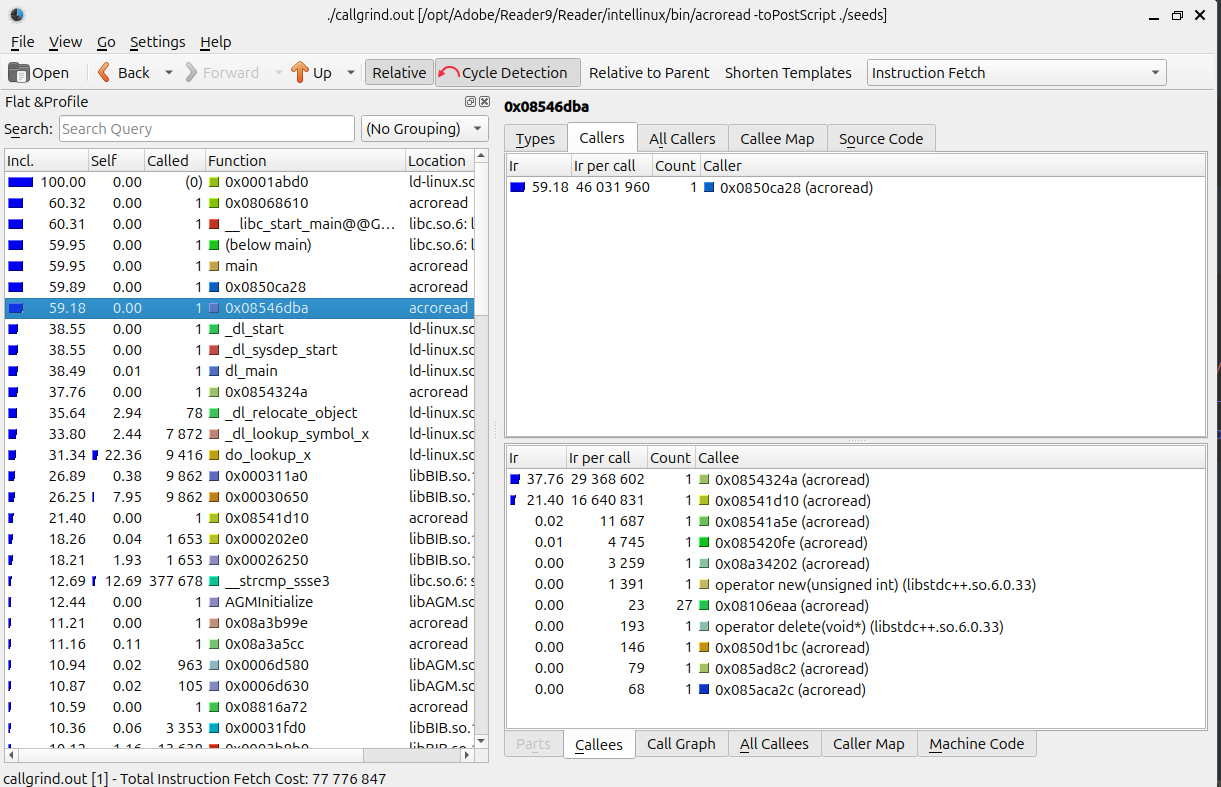
可见:

我们去 0x08546dba作为持久化点。该表默认自上而下为调用链,我们要寻找的是 incl. 值高且 self 值低的函数地址。

终极快照持久化:

1
2
3
4
5
6
7
8
9
╰─ export AFL_QEMU_SNAPSHOT=0x08546dba
export AFL_QEMU_PERSISTENT_EXITS=1 # 拦截 exit() 调用,强制跳回快照点
export AFL_QEMU_PERSISTENT_CNT=500 # 设置循环 500 次后刷新,增加稳定性

ACRO_INSTALL_DIR=/opt/Adobe/Reader9/Reader \
ACRO_CONFIG=intellinux \
LD_LIBRARY_PATH=$LD_LIBRARY_PATH:'/opt/Adobe/Reader9/Reader/intellinux/lib' \
xvfb-run -a afl-fuzz -Q -i ./seeds -o ./out -t 2000 -- \
/opt/Adobe/Reader9/Reader/intellinux/bin/acroread -toPostScript @@
1
2
3
4
5
6
7
8
9
10
11
12
13
14
15
16
17
18
19
20
21
22
23
24
25
26
27
28
29
 AFL ++4.41a {default} (.../Reader9/Reader/intellinux/bin/acroread) [explore] 
┌─ process timing ────────────────────────────────────┬─ overall results ────┐
│ run time : 0 days, 0 hrs, 20 min, 59 sec │ cycles done : 0 │
│ last new find : 0 days, 0 hrs, 0 min, 38 sec │ corpus count : 728 │
│last saved crash : 0 days, 0 hrs, 11 min, 17 sec │saved crashes : 2 │
│ last saved hang : none seen yet │ saved hangs : 0 │
├─ cycle progress ─────────────────────┬─ map coverage┴──────────────────────┤
│ now processing : 2.1 (0.3%) │ map density : 40.48% / 48.54% │
│ runs timed out : 1 (0.14%) │ count coverage : 2.61 bits/tuple │
├─ stage progress ─────────────────────┼─ findings in depth ─────────────────┤
│ now trying : trim 32/32 │ favored items : 123 (16.90%) │
│ stage execs : 23/43 (53.49%) │ new edges on : 163 (22.39%) │
│ total execs : 9557 │ total crashes : 2 (2 saved) │
exec speed : 0.00/sec (zzzz...) │ total tmouts : 0 (0 saved) │
├─ fuzzing strategy yields ────────────┴─────────────┬─ item geometry ───────┤
│ bit flips : 0/0, 0/0, 0/0 │ levels : 2 │
│ byte flips : 0/0, 0/0, 0/0 │ pending : 726 │
│ arithmetics : 0/0, 0/0, 0/0 │ pend fav : 123 │
│ known ints : 0/0, 0/0, 0/0 │ own finds : 723 │
│ dictionary : 0/0, 0/0, 0/0, 0/0 │ imported : 0 │
│havoc/splice : 720/1548, 0/0 │ stability : 97.64% │
│py/custom/rq : unused, unused, unused, unused ├───────────────────────┘
│ trim/eff : 79.80%/2092, n/a │ [cpu000:175%]
└─ strategy: explore ────────── state: in progress ──┘^C

+++ Testing aborted by user +++
[*] Writing ./out/default/fastresume.bin ...
[+] fastresume.bin successfully written with 1340384 bytes.
[+] We're done here. Have a nice day!

诊断

1
2
3
4
AFL_USE_QASAN=1 ACRO_INSTALL_DIR=/opt/Adobe/Reader9/Reader \
ACRO_CONFIG=intellinux \
LD_LIBRARY_PATH=$LD_LIBRARY_PATH:'/opt/Adobe/Reader9/Reader/intellinux/lib' \
/usr/local/bin/afl-qemu-trace -- /opt/Adobe/Reader9/Reader/intellinux/bin/acroread -toPostScript ./out/default/crashes/id:000001,sig:11,src:000000,time:581793,execs:3621,op:havoc,rep:3

使用这样的命令可以让你看到开启了地址净化器一样的效果,你可以清晰的看到调用链。

@^@

….


AFL++实战其八
https://zlsf-zl.github.io/2026/04/17/AFL-实战其八/
作者
ZLSF
发布于
2026年4月17日
许可协议